
Recipes
A recipe is a saved shape: an Ease curve or a generator with its parameters, together with its Motion Stack layers. Recipes are MotionAtelier’s presets. Loading one never changes the scene.
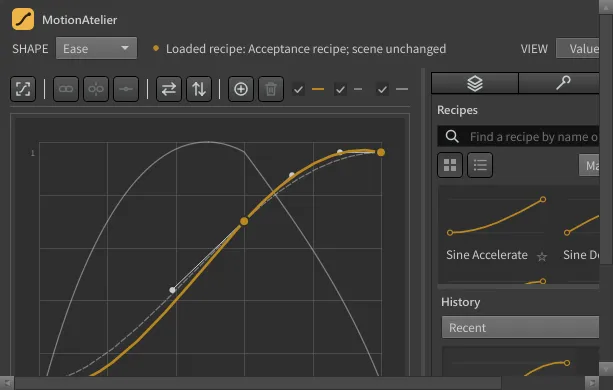
Load a recipe
Section titled “Load a recipe”- Open the Recipes tab (the third tab on the right).
- Find the recipe: type in Find a recipe by name or tag, or browse the tiles.
- Double-click the tile, or select it and press Enter.
The recipe opens in its own shape (SHAPE switches to Ease, Bounce, Elastic, Wave or Noise) with its effects, as one local undo step. The status line reads Loaded recipe: <name>; scene unchanged. Adjust it if you like, then Commit Keys.
Save the current shape
Section titled “Save the current shape”- Set up the shape and its Motion Stack.
- Right-click the recipe list and choose Save Current as Recipe, or right-click the graph and choose Save as Recipe….
- Enter a name (1–80 characters) and press OK.
The recipe stores the current shape and its effects. It is added to your library in this Houdini version’s preference folder.
Organise the library
Section titled “Organise the library”| To | Do this |
|---|---|
| Mark a favourite | Click the star on a tile, or Favorite / Unfavorite in the right-click menu. |
| Sort | Use the sort menu: Manual, Name or Favorites First. |
| Reorder | With Manual sort and an empty search, drag tiles. The order is saved. |
| Switch layout | Grid view or List view. |
| Select several | Ctrl+click toggles a tile; Shift+click selects a run. Arrow keys move the selection. |
| Rename | Right-click ▸ Rename Recipe (one recipe selected). |
| Tag | Right-click ▸ Edit Tags…: comma-separated, up to 16 tags of up to 32 characters. Search matches tags as well as names. |
| Delete | Right-click ▸ Delete Recipe, or Delete. You are asked to confirm. |
| Bring back the factory recipes | Right-click ▸ Restore Defaults. See below. |
Middle-drag scrolls the list.
Factory recipes
Section titled “Factory recipes”MotionAtelier ships 32 recipes:
| Shape | Recipes |
|---|---|
| Ease (18) | Sine, Quadratic, Cubic, Quartic, Quintic and Exponential, each as Accelerate, Decelerate and S-Curve. See Ease. |
| Bounce (4) | Heavy Drop, Soft Landing, Rubber Ball, Long Settle. See Bounce. |
| Elastic (4) | Single Overshoot, Gentle Settle, Spring Snap, Loose Wobble. See Elastic. |
| Wave (3) | Gentle Sway, Fading Ripple, Offset Swing. See Wave. |
| Noise (3) | Subtle Jitter, Handheld, Rough Shake. See Noise. |
You can rename, retag, reorder and delete factory recipes like your own. Restore Defaults resets every factory recipe to its original content, name and tags, keeping favourites and positions, and re-adds any you deleted. Your own recipes are kept. Factory recipes added by a newer MotionAtelier version appear in your library automatically, with a note in the status line.
Export and import
Section titled “Export and import”Recipes travel as .zip archives, for sharing with others or moving between Houdini versions.
Export: select one or more recipes, right-click ▸ Export Selected…, and choose a file name.
Import:
-
Press Import and choose a recipe archive (up to 16 MB).
-
The Review Recipe Import dialog lists each recipe with its Type, Status and Action:
Status Meaning Actions (default first) New Not in your library. Import, Skip Exact Duplicate Identical to a recipe you have. Skip, Import Name Conflict A different recipe with the same name exists. Keep Both (renames the import), Replace, Skip. Factory recipes cannot be replaced. Invalid The entry is damaged or unsupported. Skip only (shown as Blocked) -
Check the summary line and press Import.
Imported recipes become your own recipes. A damaged archive is rejected as a whole and nothing is imported. If the library changes while the review is open, the import is refused; import again.
Related
Section titled “Related”- History: every committed curve, kept automatically.
- Where your data is kept